
To view this content in our official product documentation, click here.
Introduction
Typically, connectors are defined with endpoints which determine exactly what data is being requested (pull customer records, post product details, etc.). However, the Prima Solutions connector works in a different way, with two generic endpoints:
- comwsomhandler
- wsomhandler
The actual data required for a request must be passed into the Prima Solutions connection shape, as part of your process flow. You do this via a manual payload shape.
Whatever is defined for the manual payload is passed into the body of the subsequent Prima Solutions connection request.
Finally - once a successful connection is made - the response must be converted from XML to JSON, ready for onward processing.
With this in mind, a process flow that needs to pull data from Prima Solutions will usually require three shapes in the following sequence:
- Manual payload shape, which includes the required request data in an XML string
- Connection shape, configured with a Prima Solutions endpoint
- Script shape, configured with an XML to JSON conversion script
For example:
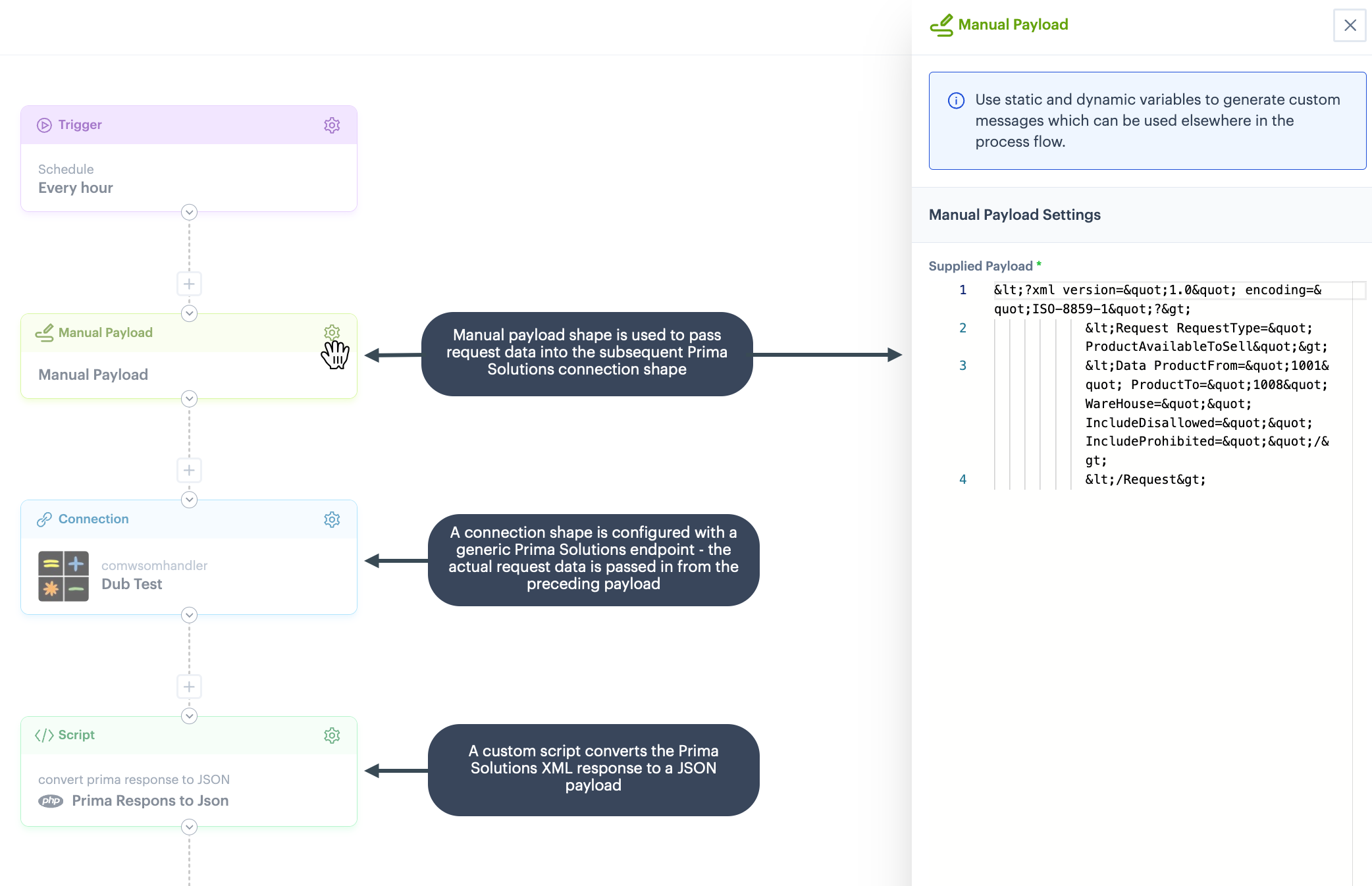
Request data
Request data to be passed into a Prima Solutions connection shape must be based on the Prima Web Services XML Schema Definition. Some examples are shown below.
 Example: NewOrder
The example below shows a NewOrder request (XML string):
{% code title="With HTML entities" overflow="wrap" lineNumbers="true" %}
<?xml version="1.0" encoding="ISO-8859-1"?>
<Request RequestType="NewOrder">
<Data Customer="""" CustDef="""" VatInclusive="""" TPGUID="""" CustomerRef="""" CustomerForename="""" CustomerSurname="""" CustomerPhone="""" CustomerEmail="""" AddrLine1="""" AddrLine2="""" AddrLine3="""" AddrLine4="""" AddrLine5="""" AddrLine6="""" Country="""" PostCode="""">
<OrderInvoiceData InvoiceTitle="""" InvoiceForename="""" InvoiceSurname="""" InvoicePhone="""" InvoiceEmail="""" InvoiceAddrLine1="""" InvoiceAddrLine2="""" InvoiceAddrLine3="""" InvoiceAddrLine4="""" InvoiceAddrLine5="""" InvoiceAddrLine6="""" InvoiceCountry="""" InvoicePostCode=""""/>
<OrderHeaderData Currency="""" OrderEmail="""" OrderStatus="""" OrderCategory="""" OrderDate="""" SendToApproval="""" SourceMedia="""" Carrier="""" CarrServ=""""/>
<OrderChargeData Charge="""" ChargeValue=""""/>
<OrderPaymentData TranAmount="""" PayMethod="""" SubPayMethod="""" PayAuthRef="""" AuthRef="""" AuthDate="""" AuthTime=""""/>
<OrderLineData Product="""" Quantity="""" Price="""" MtrxCode1="""" MtrxCode2=""""/>
</Data>
</Request>{% code title="Without HTML entities" overflow="wrap" lineNumbers="true" %}
<?xml version="1.0" encoding="ISO-8859-1"?>
<Request RequestType="NewOrder">
  <Data Customer="" CustDef="" VatInclusive="" TPGUID="" CustomerRef="" CustomerForename="" CustomerSurname="" CustomerPhone="" CustomerEmail="" AddrLine1="" AddrLine2="" AddrLine3="" AddrLine4="" AddrLine5="" AddrLine6="" Country="" PostCode="">
    <OrderInvoiceData InvoiceTitle="" InvoiceForename="" InvoiceSurname="" InvoicePhone="" InvoiceEmail="" InvoiceAddrLine1="" InvoiceAddrLine2="" InvoiceAddrLine3="" InvoiceAddrLine4="" InvoiceAddrLine5="" InvoiceAddrLine6="" InvoiceCountry="" InvoicePostCode=""/>
    <OrderHeaderData Currency="" OrderEmail="" OrderStatus="" OrderCategory="" OrderDate="" SendToApproval="" SourceMedia="" Carrier="" CarrServ=""/>
    <OrderChargeData Charge="" ChargeValue=""/>
    <OrderPaymentData TranAmount="" PayMethod="" SubPayMethod="" PayAuthRef="" AuthRef="" AuthDate="" AuthTime=""/>
    <OrderLineData Product="" Quantity="" Price="" MtrxCode1="" MtrxCode2=""/>
  </Data>
</Request>
Example: ProductAvailableToSell
The example below shows a ProductAvailableToSell request (XML string):
{% code title="With HTML entities" overflow="wrap" lineNumbers="true" %}
<?xml version="1.0" encoding="ISO-8859-1"?>
   <Request RequestType="ProductAvailableToSell">
   <Data ProductFrom="" ProductTo="" WareHouse="" IncludeDisallowed="" IncludeProhibited=""/>
   </Request>
{% code title="Without HTML entities" overflow="wrap" lineNumbers="true" %}
<?xml version="1.0" encoding="ISO-8859-1"?>
<Request RequestType="ProductAvailableToSell">
   <Data ProductFrom="" ProductTo="" WareHouse="" IncludeDisallowed="" IncludeProhibited=""/>
</Request>
The response would be in the form below:
{% code title="With HTML entities" overflow="wrap" lineNumbers="true" %}
<?xml version="1.0" encoding="ISO-8859-1" ?> <Result Company="1" RequestStatus="OK" RequestType="ProductAvailableToSell"><Data><sku AvailableDate="" AvailableQuantity="0" FTSQty="0" MtrxCode1="" MtrxCode2="" MtrxCode3="" MtrxCode4="" Product="1000"/><sku AvailableDate="" AvailableQuantity="0" FTSQty="0" MtrxCode1="" MtrxCode2="" MtrxCode3="" MtrxCode4="" Product="1001"/></Data></Result>Notice that the response is returned as an XML string. For onward processing you must convert this to a JSON payload, using a custom script.
Converting response XML to JSON
Before the response from a Prima Solutions request can be be processed, it must be converted to a JSON payload. To do this, you should create an XML to JSON conversion script and add this to a script shape in your process flow.
Comments
0 comments
Please sign in to leave a comment.